AI software + a team that sets it up with you
We build your campaigns and keep making sure your budget is well spent.
Adriva is AI software that runs your ads on Google, Facebook, and Instagram. It keeps checking every ad and keyword, and when something stops working, it gives you the fix right away. Our marketers and developers plan the strategy with you, prepare your ad accounts, set up your first campaigns, and teach you how to use Adriva. They keep helping you at every step after that.

Works withGoogle AdsMeta AdsTikTok Ads SoonLinkedIn Ads Soon
How Adriva works
More than setting budgets. Adriva watches every ad and acts right away.
01
Learns your business
It reads your website, materials, and past campaigns, and builds a business profile: what you sell, to whom, and in what tone. You don't have to describe anything from scratch.
02
Builds a campaign in a minute
Setting up a campaign yourself in Google Ads or Meta Ads Manager is hard: dozens of settings, audiences, copy, and images in different sizes. In Adriva you write in one sentence what you want to advertise, and a minute later you have a ready campaign: who it reaches, copy, images, and budget. You check it and publish it.
03
Watches every ad and keyword
It keeps comparing results with your industry's average. It catches what is easy to miss: an ad people are tired of, a keyword that costs more than the rest, a campaign that burns money.
04
Acts right away and tells you why
When something stops working, it doesn't wait for the end of the month. It suggests a fix right away, with a reason and an expected result. You apply it in one click. Adriva notes what works for you and uses it in the next campaigns.
What we do at the start
Before the ads go live, our team gets everything ready with you.
Included with Adriva. You work with experienced marketers and developers. After launch they keep helping when you have a question or want to change a campaign.
Strategy
We set goals, budget, and customer groups with you, and put them into Adriva so every campaign uses them.
Accounts ready for campaigns
We create or tidy up your Google Ads and Meta Ads Manager accounts so they are ready for campaigns. Then we connect them to Adriva.
First campaigns
We set up your first campaigns in Adriva together with you. Before anything goes live, we check the copy, images, and budget with you.
Learning Adriva
We show you step by step how to create campaigns, read results, and approve fixes. When you have a question later, you write to us.
Adriva Plus
We also take care of your website, content, and business profiles.
At no extra cost if you start by 31 December 2026
Adriva Plus is extra work our team does outside the app. It is only for Adriva clients. Companies that start working with us by 31 December 2026 get it at no extra cost.
Website
- SEO report and a list of fixes
- Fixes on your website (we need access to it)
- Copy for your website
- A new website if you have none, or yours is not worth fixing
Content
- Blog posts
- Facebook posts
Business profiles
- Google Business Profile
- Instagram account
- TikTok account
Business email
- Help setting up an address like hello@yourcompany.co.uk
The actual product,
screen by screen.
Every screenshot below comes from the live app. This is what your team works in every day.
- Dashboard
All campaigns in one place.
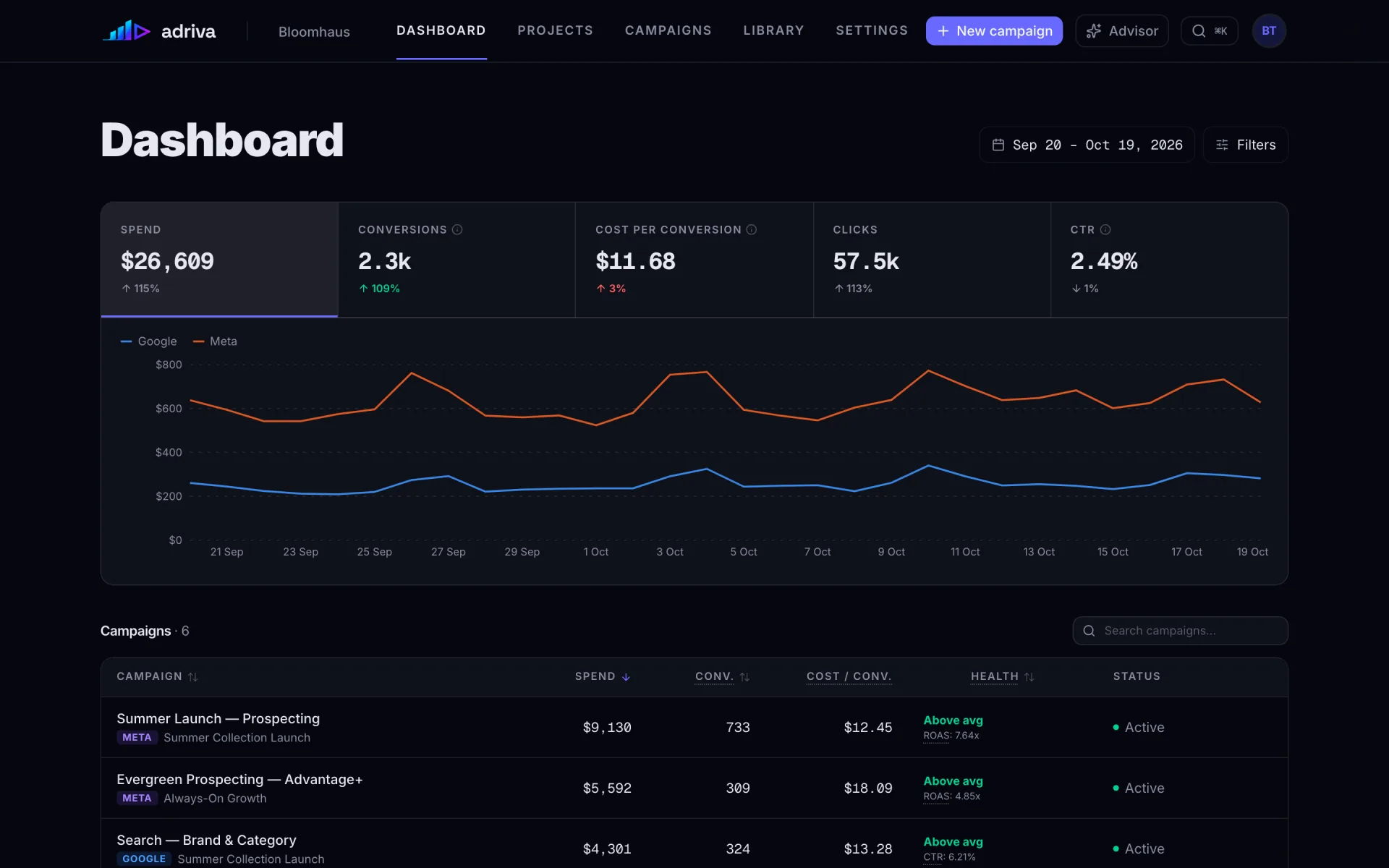
Google and Meta campaigns on one screen. You see spend, sales, cost per sale, clicks, and one daily spend chart for both platforms, without switching between two ad managers.
Each number shows the change from the period before.
- Score
One score, and what to fix to raise it.
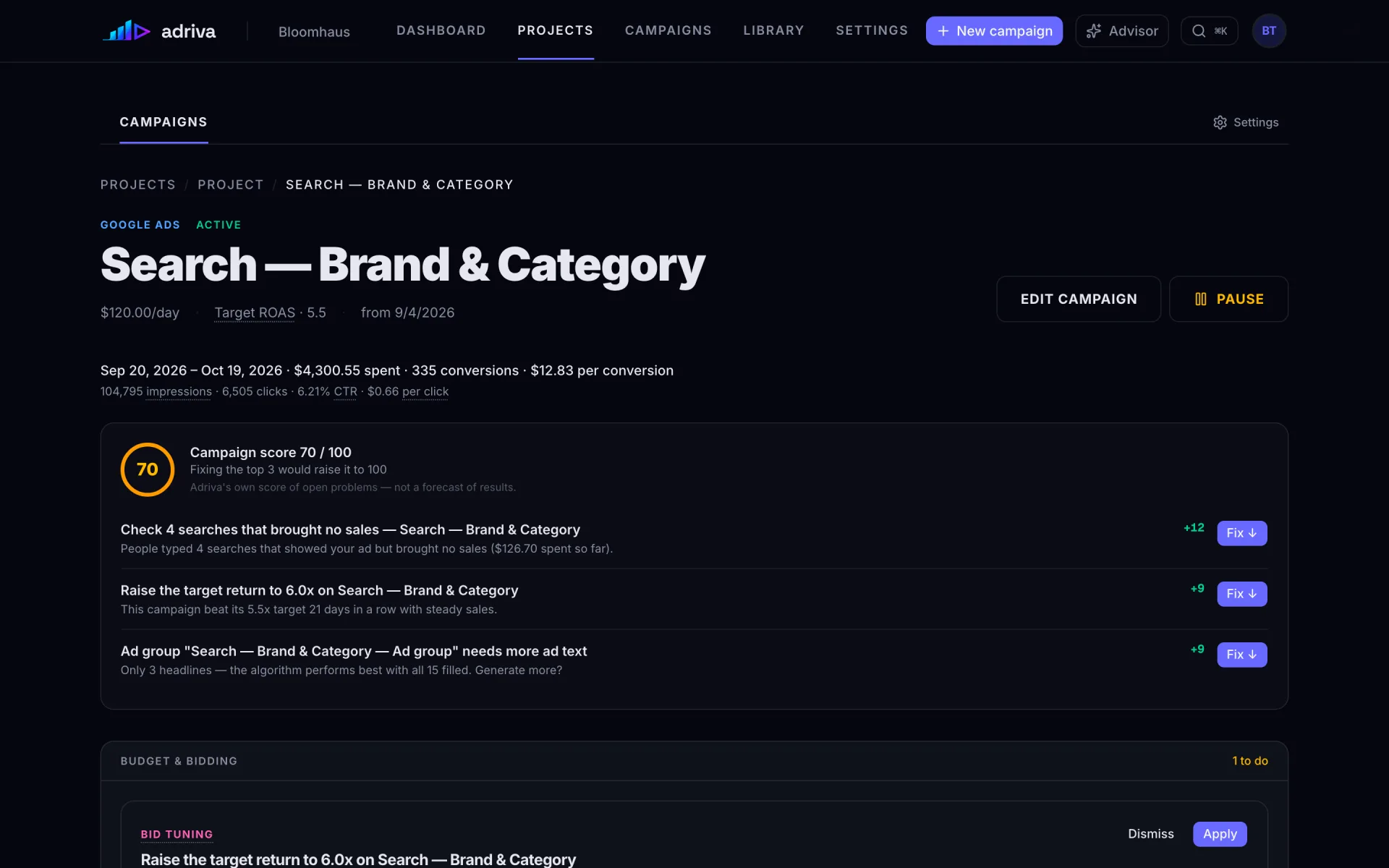
Every campaign gets a score from 0 to 100. Under it, Adriva lists the problems that pull it down, how many points each fix adds, and a Fix button for each one.
"Check 4 searches that brought no sales ($126.70 spent so far)." +12 points.
- Suggestions
Suggested changes, with reasons.
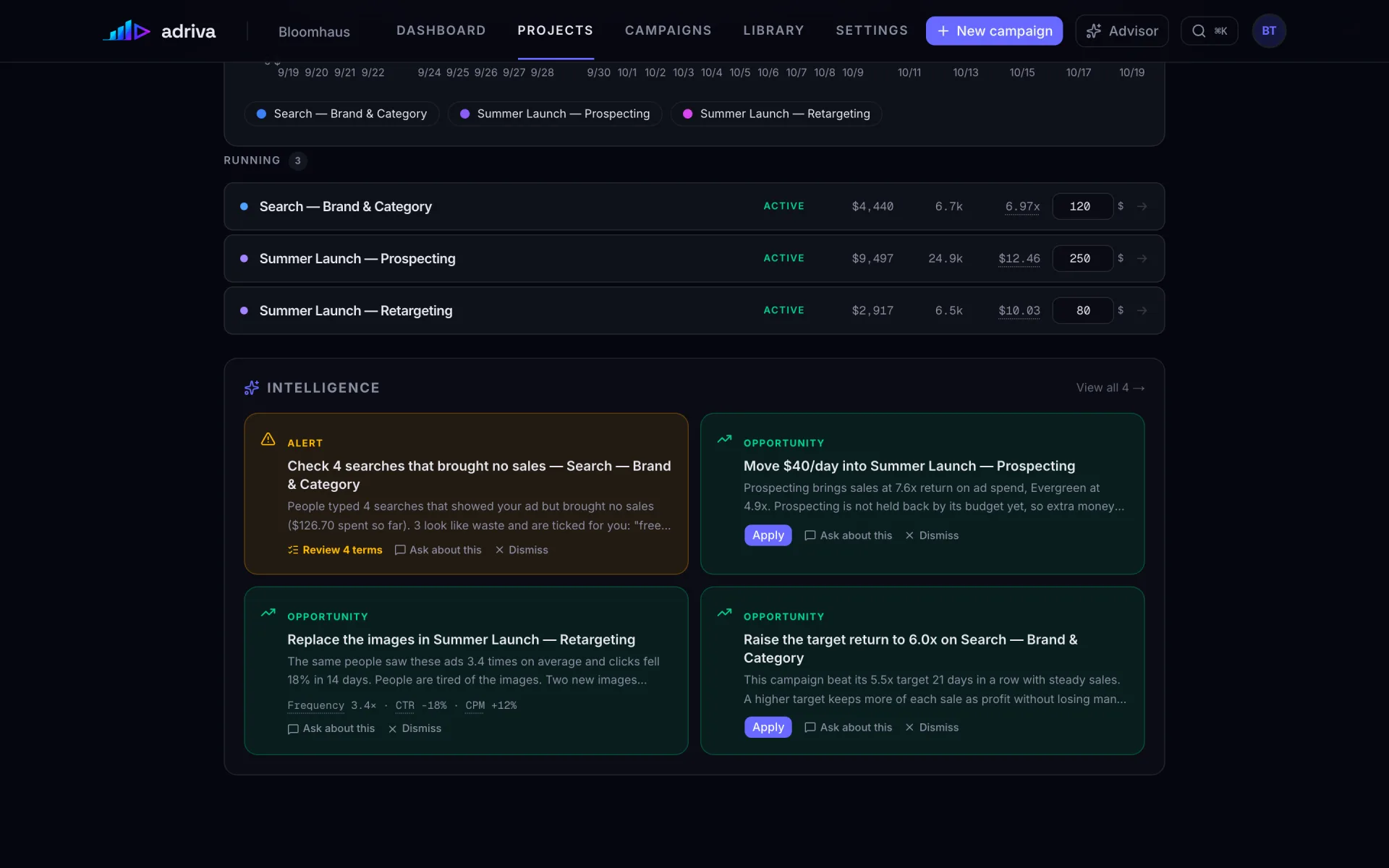
Adriva suggests where to move budget, which images to replace, and when to change a target. Each suggestion shows the numbers behind it. You apply it with one click or ask a question about it first.
"Move $40/day into Summer Launch — Prospecting."
- Ads
See every ad the way people will see it.
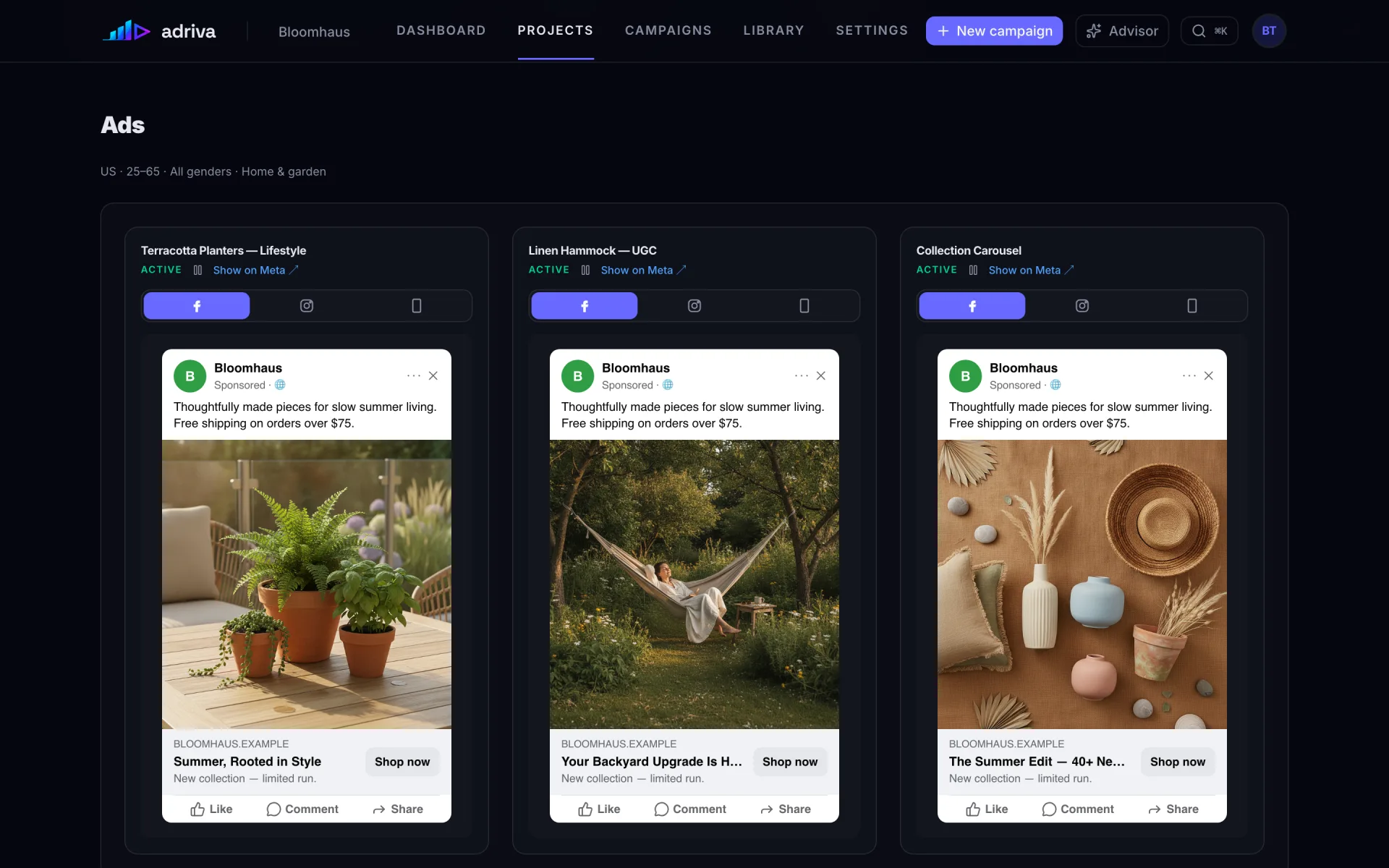
Adriva shows each ad as a real post on Facebook, Instagram, or in Stories: text, photo, headline, and button. You check how it looks before it goes live.
One switch per ad: Facebook, Instagram, Stories.
All campaigns in one place.
Google and Meta campaigns on one screen. You see spend, sales, cost per sale, clicks, and one daily spend chart for both platforms, without switching between two ad managers.
Each number shows the change from the period before.
One score, and what to fix to raise it.
Every campaign gets a score from 0 to 100. Under it, Adriva lists the problems that pull it down, how many points each fix adds, and a Fix button for each one.
"Check 4 searches that brought no sales ($126.70 spent so far)." +12 points.
Suggested changes, with reasons.
Adriva suggests where to move budget, which images to replace, and when to change a target. Each suggestion shows the numbers behind it. You apply it with one click or ask a question about it first.
"Move $40/day into Summer Launch — Prospecting."
See every ad the way people will see it.
Adriva shows each ad as a real post on Facebook, Instagram, or in Stories: text, photo, headline, and button. You check how it looks before it goes live.
One switch per ad: Facebook, Instagram, Stories.
Know which campaigns are working.
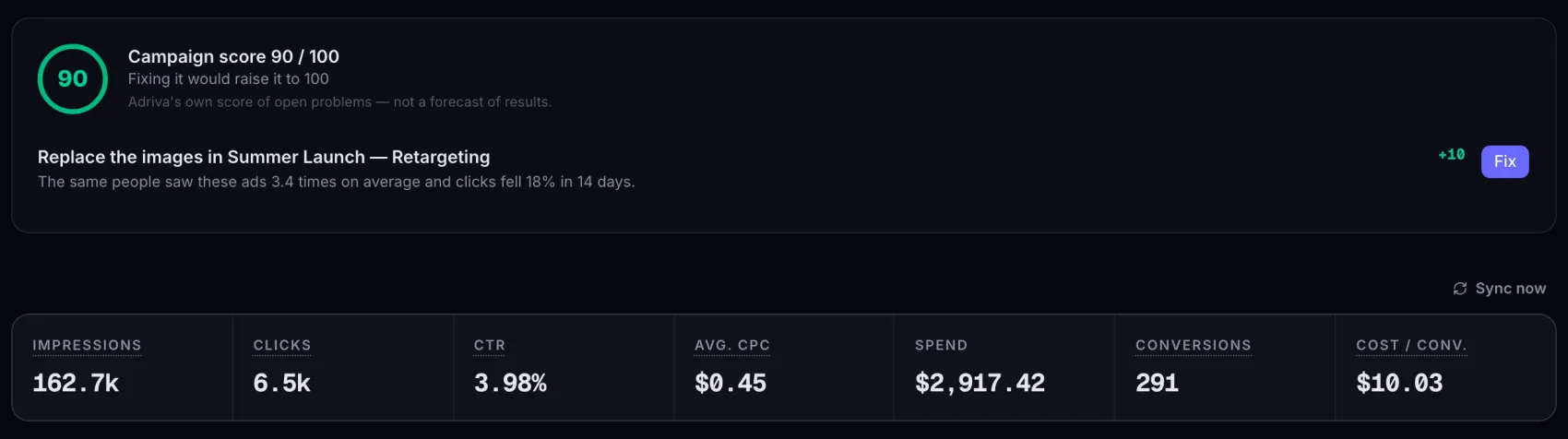
Ad managers show raw numbers. Adriva gives each campaign a score from 0 to 100 and tells you what to fix to raise it. It also warns you when people have seen an ad too many times, before results drop.
One score per campaign
“Campaign score 90/100. Fixing it would raise it to 100.” You see where a campaign stands without reading ten columns.
Ad fatigue alerts
When the same people see an ad too often (frequency), it costs more (CPM) and gets fewer clicks (CTR). Adriva flags the ad so you can replace it before results drop.
Frequency ↑CPM ↑CTR ↓Ad flagged
Results per ad
See each ad's copy, image, and call to action next to its results. Replace weak ads with AI-generated variants.
Ask questions about your ads.
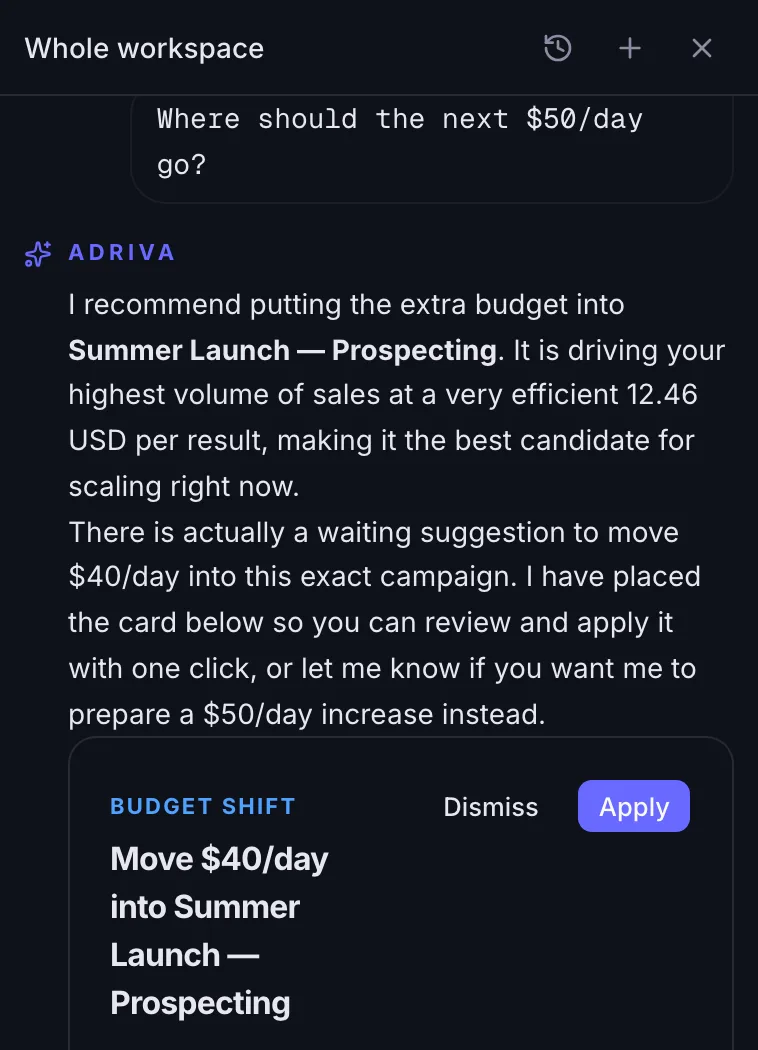
The advisor sees all your campaigns and their results. It answers with your own numbers.
- Ask things like “where should the next $50/day go?”
- Answers use your own numbers, like cost per sale and return on ad spend.
- It can prepare the change it suggests. Nothing goes live until you approve it.
See Adriva on your own business.
On the call we show how Adriva would run your ads and how our team sets it up with you. Start by 31 December 2026 and you get Adriva Plus at no extra cost.
Live on Google Ads + Meta Ads